299Bet Official App — Android & iOS

The 299Bet mobile app gives you full access to slots, live casino, sports betting and crash games from your phone. Works on Android via APK and on iOS via PWA. Supports BDT, bKash, Nagad and Rocket. Interface available in Bengali and English with 24/7 support. One account syncs across all your devices instantly.

Why use the 299Bet app instead of the browser

The mobile browser works, but the app is faster, more stable and better suited for live betting and live casino sessions. Pages load without lag, deposits go through in seconds, and you stay logged in without session timeouts.

Key advantages of the app over the browser version:

  • No re-login every session - credentials stay saved
  • Push notifications for promotions, VIP bonuses and weekly payouts
  • Optimised layout for small screens - no zooming or scrolling sideways
  • Direct deposit and withdrawal shortcuts from the home screen
  • Reward Center, Rebate and Invite Friends accessible in two taps

The app supports Bengali and English interface, which matters for players in Bangladesh who prefer to navigate in their native language.

Open 299Bet Official Site

How to download the 299Bet app

The app is not available on Google Play or the Apple App Store. Download it directly from the official 299Bet website or one of the verified mirror domains: 299bet.com, 299bet.bet, 299bet88.com or 299betbd.com.

Steps to find the download link:

  1. Open 299bet.com in your mobile browser
  2. Tap the download banner or go to the app section
  3. Choose Android APK or iOS install option
  4. Follow the on-screen instructions

Do not download APK files from Telegram channels, Facebook groups or third-party sites. The official source is the 299Bet website only. The platform warns players not to transfer funds based on instructions received in private messages outside official channels.

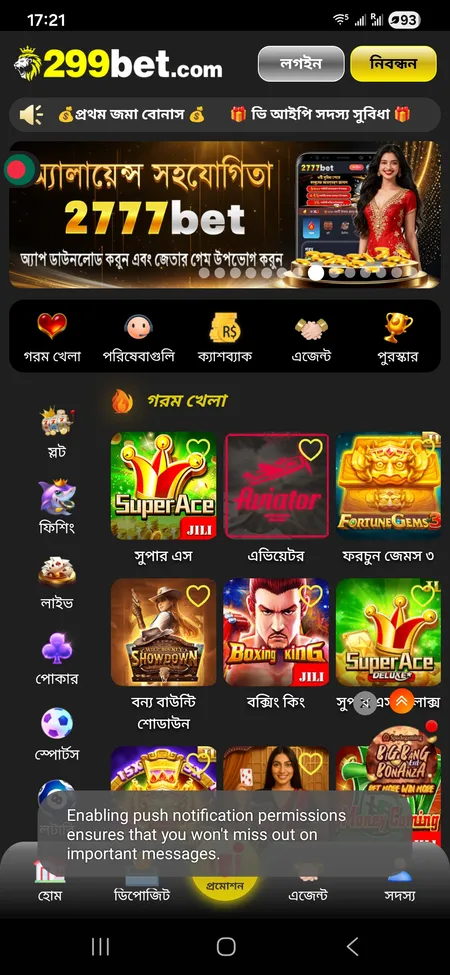
299Bet app home screen with games and menu

Main screen of the 299Bet app showing slots, live casino, sports and bottom navigation bar.

Android APK installation guide

Android does not allow APK installs from unknown sources by default. You need to enable this setting once before installing.

Step-by-step for Android

  1. Go to Settings on your phone
  2. Open Security or Privacy settings
  3. Enable 'Install from unknown sources' or 'Allow this source' when prompted
  4. Download the 299Bet APK from the official site
  5. Open the downloaded file and tap Install
  6. Wait for the install to complete, then open the app

Common issues during installation:

  • 'App not installed' error - usually means not enough storage space (free up at least 100 MB)
  • 'Blocked by Play Protect' warning - tap 'Install anyway' if you downloaded from the official site
  • App crashes on launch - restart your device and try again

The APK works on Android 5.0 and higher. Most Android phones sold in Bangladesh since 2016 are compatible.

Get the APK File

iOS installation: PWA and Home Screen shortcut

Apple does not allow sideloading APK files. The 299Bet iOS option works as a Progressive Web App (PWA) or a Home Screen shortcut that behaves like a native app.

How to install on iPhone or iPad

  1. Open Safari (must be Safari, not Chrome or Firefox)
  2. Go to 299bet.com
  3. Tap the Share button (the box with an arrow pointing up)
  4. Select 'Add to Home Screen'
  5. Confirm the name and tap Add

The icon will appear on your home screen. Tap it to open 299Bet in a full-screen view without the browser address bar. You stay logged in between sessions and receive notifications if you allow them.

This method works on iOS 13 and higher. No profile installation or jailbreak is needed.

299Bet registration screen on Android

Android APK

Download the APK file from 299bet.com. Enable unknown sources in your phone settings, install the file and launch the app. Works on Android 5.0 and above. Full app experience with push notifications.

299Bet login screen on iOS device

iOS PWA

Open 299bet.com in Safari, tap Share, then Add to Home Screen. The app icon appears on your home screen. Works on iOS 13 and above. No App Store needed, no jailbreak required.

System requirements and compatibility

Requirement Android iOS
Minimum OS version Android 5.0 iOS 13.0
Storage needed ~80 MB ~10 MB (PWA)
Internet connection 3G minimum, 4G recommended 3G minimum, 4G recommended
Browser for install Any Safari only

The app does not require a high-end device. Most entry-level smartphones with 1 GB RAM and Android 5.0 can run it without issues. For live casino streams, a stable 4G or Wi-Fi connection is recommended.

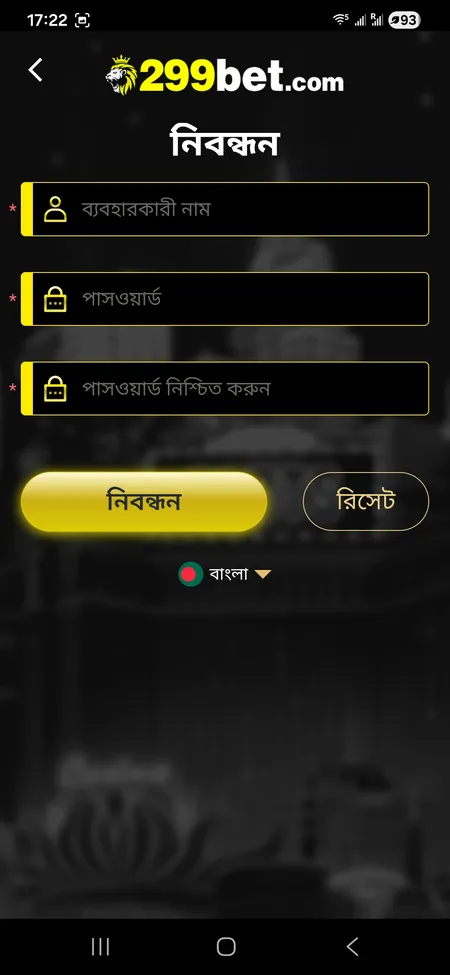
Registration inside the app

If you do not have a 299Bet account yet, you can register directly in the app. The process takes under two minutes.

Required details:

  • Username (বব্যহারকারী নাম)
  • Password and password confirmation
  • Phone number (11 digits)
  • Referral code (optional)
  • Confirm you are 18 or older
  • Accept Terms and Conditions

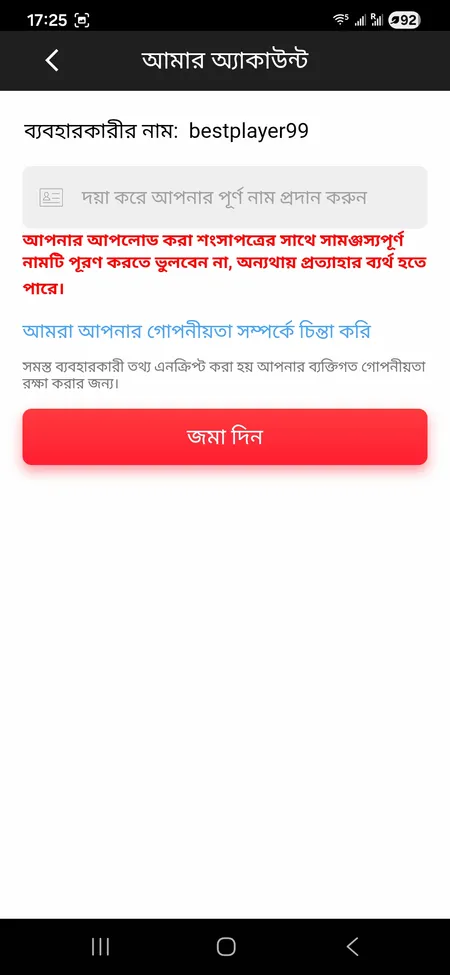
After registration, go to My Account and add your full name. The name must match the documents you submit for verification - if there is a mismatch, withdrawal requests may be declined. Visit the 299Bet registration page for the full step-by-step guide.

The minimum first deposit is BDT 100. When making your first deposit, select the 'First Deposit Promotion' option to activate the welcome bonus automatically.

299Bet account edit screen with full name field

Profile settings screen: enter your full name to match your verification documents. Required for withdrawals.

Create Your 299Bet Account

Login and account management in the app

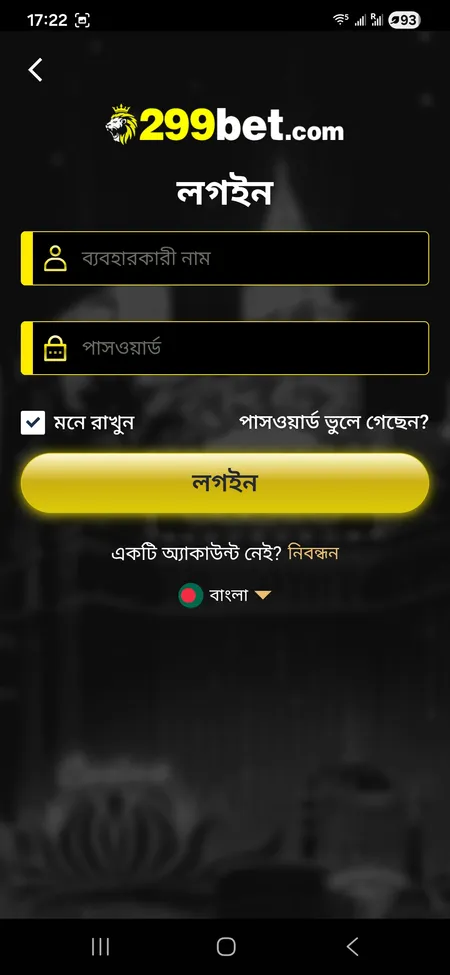
The login screen asks for your username and password. Check 'Remember me' to stay signed in. If you forget your credentials, contact 24/7 support - password recovery is handled by the support team, not an automated email link.

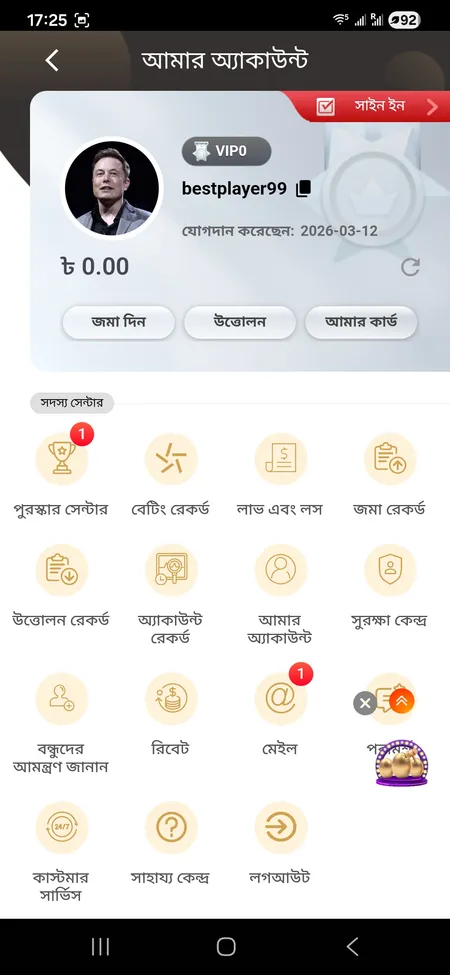
Inside My Account you can access:

  • Deposit and Withdrawal forms
  • Betting Record and Profit and Loss reports
  • Deposit and Withdrawal history
  • Reward Center with daily sign-in bonus
  • Rebate (Manual Rebate and history, GMT+8 time)
  • Invite Friends with your referral link
  • Security Center for password and e-wallet settings
  • Mail and notifications from the platform

The VIP level is shown in the account header. Bets across slots, table games, fishing, sports and lottery all count toward your cumulative VIP score.

299Bet My Account menu with member center options

Member Center in the 299Bet app: access deposits, withdrawals, betting records, rewards and support from one screen.

Bonuses available through the app

All promotions from the main site are available in the app. Some are easier to claim through the mobile interface.

Bonus Details
First Deposit Up to 59%, wagering 20x, slots and fishing only
Daily Cashback Up to 3%, claim via Home - Cashback - Collect
Loss Recovery From BDT 5 to BDT 50,000 depending on net loss, paid at 3:00 Bangladesh time
Referral Reward BDT 300 per valid invite (deposit BDT 2,300 plus valid bet BDT 3,000)
VIP Weekly Bonus Paid every Monday at 6:00 Bangladesh time
VIP Monthly Bonus Paid on the 1st of each month at 6:00 Bangladesh time

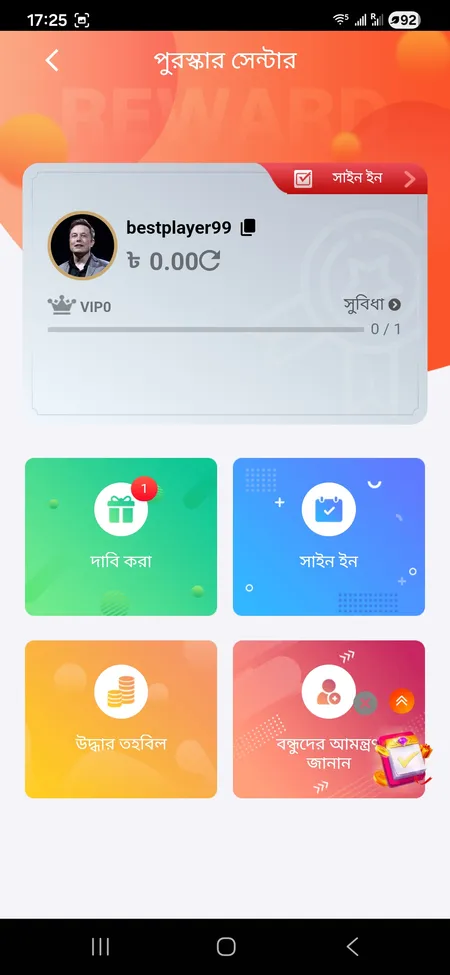
The Reward Center in the app shows your current claim status. Tap Sign In daily to keep your streak and collect sign-in rewards.

299Bet Reward Center with claim and sign-in options

Reward Center screen: daily sign-in, claim rewards, recovery fund and invite friends in one place.

Claim Your Bonus

Payments in the app: deposit and withdrawal

The 299Bet app supports all major payment methods used in Bangladesh. Deposits go through the in-app form - never transfer money based on a request in Telegram or Facebook private messages.

Payment methods available:

Minimum deposit: BDT 100. Withdrawals require KYC verification - the platform states review takes approximately 24 hours. Bonus funds can only be withdrawn after meeting the required wagering turnover (1x for loss recovery, 20x for the first deposit bonus).

For deposit help, see the 299Bet official site or visit the Help Center inside the app.

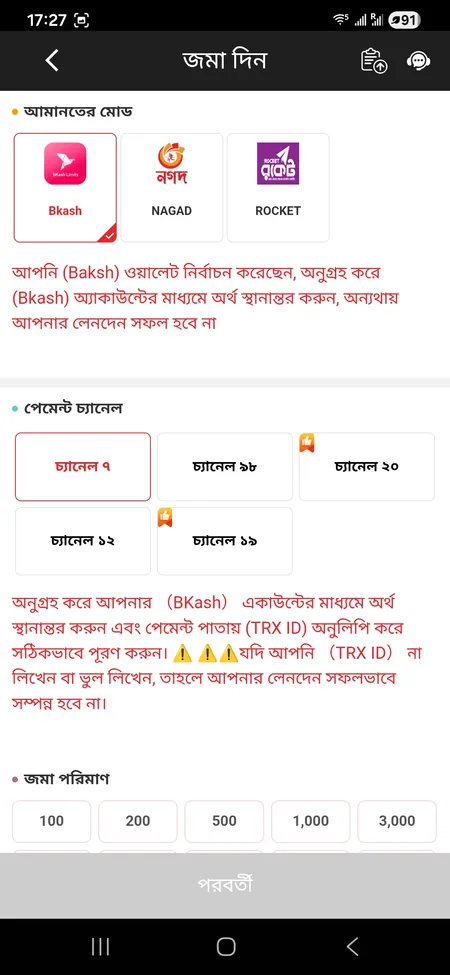
299Bet deposit form in the app

Deposit screen: select payment method, enter amount in BDT and confirm. Minimum deposit is BDT 100.

Security and data protection

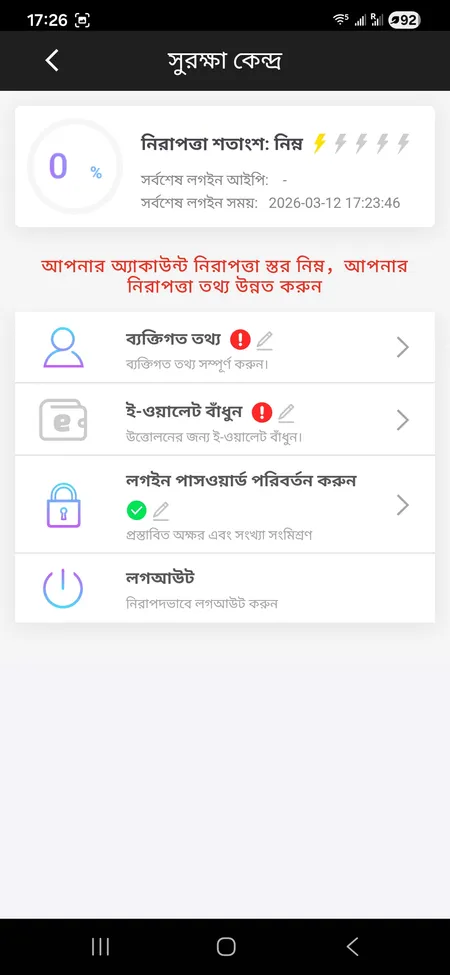
The 299Bet platform states it uses SSL encryption for all data transmission. The Security Center inside the app lets you update your password, link your e-wallet and review login activity.

Key security features:

  • SSL encryption on all transactions and personal data
  • Name verification tied to withdrawal approval
  • Certified RNG declared for casino games
  • Account freeze for suspicious activity (multiple accounts, shared IP)

The platform is operated by Bettor IO N.V. and holds an offshore licence from the Curacao government under Master License Gaming Services Provider N.V. number 365/JAZ. Players must be 18 or older. Responsible gaming tools including deposit limits and self-exclusion are mentioned in brand materials.

299Bet Security Center showing account protection settings

Security Center: check your protection level, update personal details, link e-wallet and change your password.

Updating the app

Since the app is not on Google Play or the App Store, there are no automatic updates. When a new version is available, you will typically see a notification inside the app or a banner on the 299Bet website.

To update on Android: download the new APK from the official site and install it over the existing version. Your account data and balance are not affected.

To update on iOS (PWA): no action needed. The PWA loads the latest version from the server every time you open it from your home screen shortcut.

Check the 299Bet app download page or the Telegram channel @bd299bet for update announcements.

The 299Bet app is ready to install on your Android or iOS device. Access slots, live casino, sports betting and all your bonuses from one place.

FAQ: 299Bet App

Where can I download the 299Bet APK?

Download it directly from 299bet.com or verified mirror domains like 299bet88.com or 299betbd.com. Do not use third-party sites or Telegram links from unknown sources.

Does the 299Bet app work on iPhone?

Yes. Open 299bet.com in Safari, tap Share, then Add to Home Screen. This creates a PWA shortcut that works like a native app. Requires iOS 13 or higher.

What Android version does the app need?

Android 5.0 or higher. Most smartphones sold in Bangladesh since 2016 meet this requirement. You need to enable installation from unknown sources in your phone settings first.

Can I use the same account on my phone and computer?

Yes. One 299Bet account works across all devices. Your balance, VIP level, betting history and bonuses stay synced automatically.

Why is my APK install blocked?

Android blocks installs from unknown sources by default. Go to Settings - Security - enable Unknown Sources or Allow this source. If Play Protect shows a warning, tap Install anyway.

How do I claim the first deposit bonus in the app?

Register, log in, go to Deposit, and when making your first deposit select the First Deposit Promotion option. The bonus is added automatically. Minimum deposit is BDT 100.

Which payment methods work in the app?

bKash, Nagad, Rocket, bank transfer, Visa and Mastercard. All deposits and withdrawals go through the official in-app forms only.

How do I update the app?

For Android, download the new APK from the official site and install it. For iOS PWA, no update is needed - it loads the latest version automatically each time you open it.

What do I do if I forget my login password?

Contact 299Bet customer support via live chat or Telegram @bd299bet. Support is available 24/7 in English and Bengali. There is no automated email recovery link.

Are the games in the app the same as on the website?

Yes. Slots, live casino, sports betting, poker, fishing games, lottery and crash games are all available in the app. Providers include JILI, Pragmatic Play, Evolution Gaming, Spribe and others.